

USED BY:






Previous
Next
Increase Utilization
Increase the utilization of your meeting spaces by automating business rules and access rights.
- Prevent double-bookings and conflicts.
- Limit abuse by setting clear business rules.
- Control who can book by applying access rights.


Tailored Booking Options
Book using various methods that is suitable for your needs.
- Map view with color codes to check availability.
- Outlook like scheduler view to see timeline.
- Advanced form to perform recurring and custom bookings.
Avoid No-Shows
Eliminate ghost-meetings which are booked but never used. Bring the meeting rooms back in control.
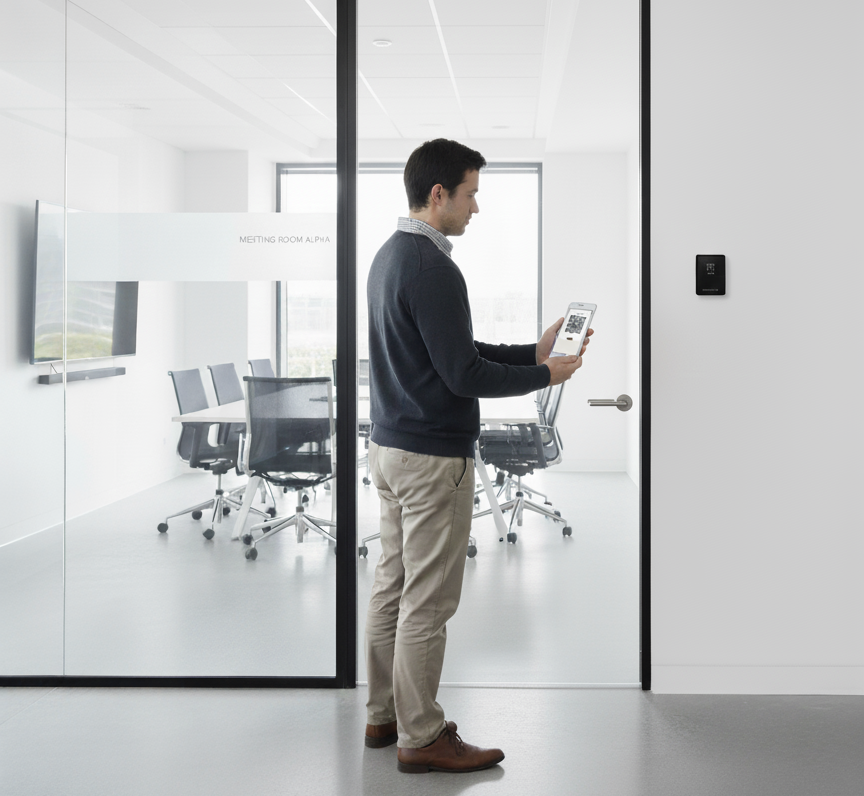
- Check-in via QR, Mobile, Web, or Tablets.
- Check-in reminders via email and mobile app.
- Auto-cancel bookings not checked-in.
Book On The Go
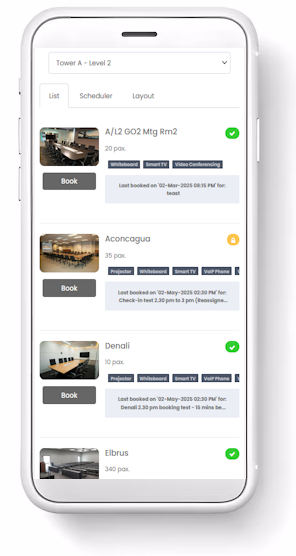
Access the entire office space using a mobile app. Simple intuitive interface to schedule your room bookings and desk reservations. View your upcoming reservations in your personalized landing page.
- Scheduler based booking with color status indicators.
- Find the right meeting rooms across locations and time zones.
- App notifications for reminders.
Works With Microsoft Office & Google Workspace
Use your existing calendaring applications like Office 365 or Google Suite to synchronize bookings. Link your directory services to automatically synchronize users.
- Near real-time synchronization of calendars.
- Synchronize users daily from your enterprise directory.
- Use Single Sign On authentication.
Meeting Room Signage
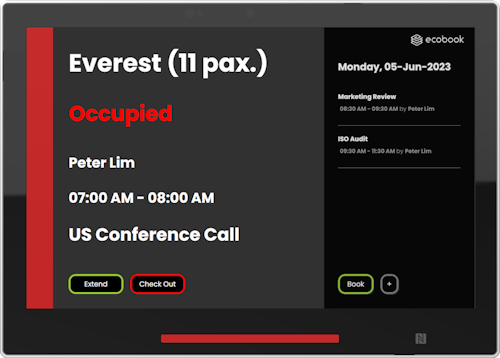
A beautifully designed digital signage outside your meeting room is the perfect add-on to increase productivity and access to the reservation while augmenting your corporate brand.
- LED status lights to indicate availability.
- PIN or NFC based authentication.
- Customized design to suite your corporate brand.
Why Choose ecobook
Highly secured environment with enterprise-grade security. 256-bit encryption. Daily backups. Built-in redundancy.
ISO 27001 certified. Fully compliant with Personal Information (PII) Protection Policies.
Local support from 8:00 am to 6:00 pm from Mon-Fri. Unlimited email and telephone assistance. Optional on-site visits if required.
Hosted on Microsoft Azure. Azure is a highly secure, global cloud service provider with rigorous security and compliance certifications.
Get in Touch
Get started by filling up the form here.
Our professional consultants will get in touch with you to help guide your path towards a modern workplace.
Get a complete demonstration of our product online and a no-obligations free trial of the full product features.
Frequently Asked Questions on Room Booking
The modern, open workplace emphasizes collaboration and teamwork more than anything else.
So, the demand for meeting rooms is ever greater with globally dispersed teams and customer base.
With such high demand for meeting spaces, there is a need for managing the meeting rooms and controlling their usage.
This is where a meeting room booking system becomes an important tool in your workplace.
Learn more from our article on When Do You Need A Room Booking System?
There are tremendous benefits that organizations can realize from using a meeting room booking system like ecobook.
- Increased room utilization by reducing no-shows and ghost meetings.
- Increased productivity by allowing people to look up available rooms and select the ones best suited for their needs.
- Less need for office administrators and assistants to coordinate and manage the meeting rooms.
- Management has a better understanding of the space utilization through the meeting room booking system. It means, they can make better decisions on future planning.
You can read more about the benefits through our details articles:
While existing calendaring systems such as Microsoft Office 365 and Google Workspace are very good tools for scheduling meeting rooms, they come with certain limitations.
For instance:
- They do not have fine-grained control over the business rules.
- The ability to set restrictions and control access lies in the hand of IT departments instead of end-users.
- They cannot directly link to digital signage or visitor management system.
- They do not have check-in features and have no control over the meeting room utilization or occupancy.
To augment the scheduling system or to have a dedicated system to manage the workplace, a meeting room booking system can play an important role in ensuring your workplace is being used efficiently.
Read more from there articles:
Implementing a meeting room booking system in your office is a fairly straight-forward initiative.
Essentially, it requires planning on how you implement the meeting room, allocations, and business rules.
In addition, you can choose to link the meeting rooms to the existing scheduling systems.
There are different ways to ensure the proper usage of meeting rooms using the room booking system .
No-shows and ghost meetings are a bane to most organizations. With some basic configurations and settings, you can dramatically improve the utilization of meeting rooms.
For example:
- Mobile or web based check-in.
- QR-Code based check-in.
- Auto-cancellation and no-shows.
- Sensor based occupancy detection.
You can read more about the different ways ecobook can help on this aspect here:
Control is a very important aspect in a open, hybrid workplace environment.
ecobook has several ways of controlling the usage of meeting rooms such as:
- Restricting users to specific meeting rooms at certain buildings and locations.
- Group permissions to set viewing and booking rights for meeting rooms.
- Booking restrictions such as booking hours, lead times, advance booking windows and day-of-week permissions.
- Controlled rooms with approvals.
- Setting check-in periods and auto-cancellation functionality to release unused meeting room bookings.
You can read more about how our meeting booking system allows better control of the desks here:
What Customers Say

Overall a very pleasant and smooth experience. Customer service was top-notch and would encourage everyone to give it a try.
Anoop MuraliSenior Infrastructure Engineer in Australia
Our experience so far has been fantastic. We have been so happy to use it to serve our business. Thank you. I recommend you to try it.
Marciano FernandezSystem Analyst
The system was very user friendly and our users is able to search and book our meeting rooms with ease. Beside the software, their customer and after sale services was also very good.
Kelvin OngSenior Associate Executive
Advance booking helped in eliminating double booking and we also integrated equipment booking like Projectors, White Boards etc.
Krishna kumarRegional Sales Director
Previous
Next