
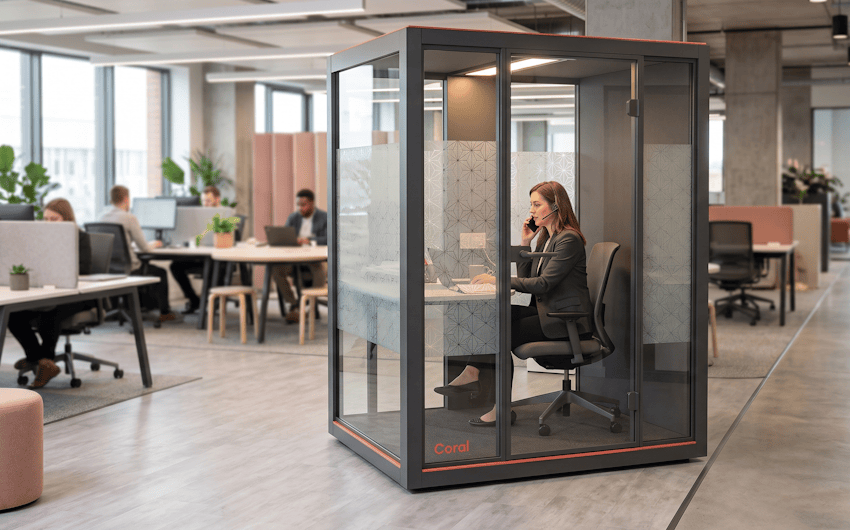
Sometimes you just need a minute of quiet. A private call, a stretch of focus, or a short breather away from the noise. You do not always want to book a room and shut a door to get it. A solo pod covers that gap. It is a small, part enclosed space for one person, with privacy film or a partial wall instead of a sealed box. You get visual privacy and a bit of sound cover without the closed in feeling. Pods are not bookable. You grab one when it is free, and a rough two hour cap keeps them turning over. Below, we discuss how to size pods, mix the configurations, place them, and track their use in ecobook.
When and Why Organisations Use Solo Pods
A pod sits between a solo booth and a high back sofa. Less formal than a booth, more private than a sofa. It earns its place when someone needs a quick bit of privacy and does not want to plan for it. A sensitive call. A short reset. Twenty minutes of focus. You do not book it, you just use it. How much you lean on pods depends a lot on the work. A team that lives on the phone will fill them. A team that is mostly remote will not.
You tend to want solo pods when:
1. Hybrid work creates ad hoc privacy needs. People in for the day still need a quiet spot now and then.
2. Wellbeing matters to you. A short break from the open plan helps people reset.
3. Calls are frequent but short. Not every call needs a booked meeting room.
4. You value privacy people do not have to plan. Grab it and go.
5. Space is tight. Pods pack more privacy into less floor than a full booth.
Context matters. A customer facing call centre will lean on pods all day. A remote first company with one office day a week will barely use them.
Solo Pod Specifications
| Specification | Guidance |
| Interior floor area | Enough room for one person to sit or stand without feeling boxed in. |
| Configuration options | A sitting pod, a standing pod, or a lounge pod, so people can pick the posture. |
| Enclosure style | Privacy film or partial walls, with the door left open for airflow. |
| Door swing | Opens outward into the walkway so the person inside controls the space. |
| Acoustic performance | Some sound cover. Soft finishes cut echo but do not block sound fully. |
| Ventilation | Open door or a vent so air moves. Never a sealed pod. |
| Power and data | A power outlet or two, plus a data point for laptop work. |
| Lighting | Warm internal light if enclosed, or the office light if it is open sided. |
| Workpoint value | A small share of total workpoints. Not bookable, with a rough two hour cap per use. |
Design Considerations That Balance Privacy and Openness
The big call is privacy film against solid walls. Film keeps the pod feeling open and part of the floor while still hiding the person inside. Solid walls give more privacy but can feel closed off and a bit institutional. In an open plan, film usually wins. The door is the other trade off. A door that shuts gives more privacy but adds noise every time it swings, so some designs skip it or use an open sided layout that stays private without sealing.
Variety and placement do the rest. A sitting pod for focus, a standing pod for a quick call, and a lounge pod for a breather cover different needs, so mix them rather than buying one type. And spread them around. Pods dotted across zones get found and used. A cluster in one corner does not. Put them near pantries, quiet zones, and busy routes.
Common Mistakes to Avoid
A few mistakes come up again and again:
1. Sealing pods shut. A closed pod gets stuffy fast. Leave airflow through the door or a vent panel.
2. Buying one posture. People want to sit, stand, or lounge depending on the task, so offer a mix.
3. Putting pods in the quiet zone. Pods draw calls and short chats, which interrupt nearby focus work. Keep them in the active areas.
4. Making them too small. A tight pod feels cramped after a few minutes. Give people room to settle in.
How Solo Pods Are Managed in ecobook
Solo pods run first come first served with a maximum bookingduration window, and that is the point. You can leave them completely open, which is simplest and needs no admin. The downside is you have no record of use and no way to stop someone parking in one all afternoon. The alternative is to consider the solo pod as a desk and park it under desk booking in ecobook as it can only accomodate one person. You can also add occupancy sensors, which log which pods get used and for how long. The downside is the extra cost and setup. You can also mount a mini digital signage to help users quickly book the space if they need to take any important calls. Either way, ecobook shows you the pattern. If the sensors say pods are full most of the day, that is your case for adding more. If some sit empty, check whether people can find them.
Frequently Asked Questions
What’s the difference between a solo pod and a solo booth?
A booth is fully enclosed and made for longer focus work and confidential calls. A pod is part enclosed and made for short bursts of privacy without feeling sealed. Booths may be bookable. Pods are first come first served. Use booths for heavy confidential work and pods for quick, ad hoc privacy.
Should we provide sitting, standing, and lounge pods, or just one type?
A mix works best. Roughly half sitting, then some standing and some lounge. Watch how they get used and adjust the mix over time.
How do we prevent people from monopolising pods?
Set the two hour norm with a sign and a bit of culture. If someone sits in a pod for hours, it shows, and peer pressure usually sorts it out. Sensors help you see it, but goodwill does most of the work.
Wrapping Up
For example, a customer support team of around 60 people kept ducking into stairwells to take calls because the meeting rooms were always booked. It was awkward and it did not scale. They put in a row of sitting and standing pods near the support desks and left them open, first come first served. The stairwell calls stopped, and the occupancy sensors showed the standing pods busiest at midday. Plan your pods around real usage, connect them to ecobook, and let the data tell you where to add more. Book a walkthrough with ecobook today.