
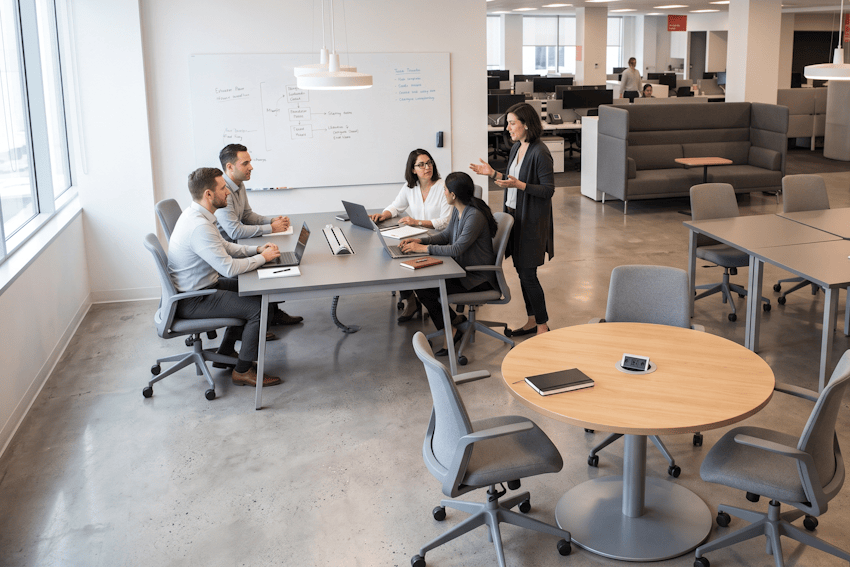
Open collaboration tables are the workhorse of the modern office. They are informal, flexible spots where a team of four to six can sit down together, brainstorm, and get work done. Unlike assigned desks, they are first come first served. Unlike meeting rooms, you do not book them. Arranged in clusters or zones, they make up close to half of all the workpoints in a lot of offices. This is where most of the informal teamwork happens, from project huddles to quick strategy sessions to cross team problem solving. How good and how flexible these tables are often decides whether people actually want to come in. Below, we discuss how to specify collaboration tables, lay them out, and manage them in ecobook.
When and Why Organisations Invest in Collaboration Tables
Collaboration tables exist because most work now happens with other people, not alone. Even roles that look solo, like designers, analysts, and engineers, gain from sitting close to their team for a quick question or a bit of pair work. Old open plan offices with assigned desks tried to do this, but people in fixed seats get territorial and talk to each other less. Flexible tables send a plainer signal. This space is for working together, and that is how people use it.
You tend to lean on collaboration tables when:
1. Team based work is the norm, as in product teams, agile software, creative studios, and professional services.
2. You want more spontaneous collaboration and cross team connection.
3. You are planning for peak occupancy, with teams clustering around shared tables instead of spreading across assigned desks.
4. Hybrid schedules are the reality, and flexible seating copes with different arrival patterns.
5. You are designing around activity, with a range of table shapes near other space types to support different kinds of work.
Context shapes the layout. A tech company doing pair programming may want more two person adjacencies. A law firm with set small teams may prefer clear four to six person clusters. A creative studio that huddles often may want modular tables it can push together for an all hands. So there is no single right mix. It depends a lot on how your teams actually work.
Collaboration Table Specifications
| Specification | Guidance |
| 4-person table dimensions | Sized for four to sit comfortably. Round works for conversation, rectangular for laid out work, modular for reconfiguring. |
| 6-person table dimensions | Roomier, for a full team. Same choice of round, rectangular, or modular depending on how the group works. |
| Table height | Standard sitting height, with a share of height adjustable tables for people who like to stand. |
| Approach space per person | Enough room to sit down, get out, and not knock into a neighbour. |
| Seating | Ergonomic task chairs with lumbar support and adjustable height. This is where comfort pays off. |
| Power and data | Enough outlets and data points that everyone at the table can plug in without hunting. |
| Surface finish | Durable, wipeable tops with a matte finish to cut glare. |
| Modular flexibility | Tables that nest, stack, or reconfigure for different layouts and all hands gatherings. |
| Workpoint value | Usually close to half of all workpoints, split across four and six person setups. |
Design Considerations That Maximize Usage
Shape and mix matter more than you would think. Round tables get people talking and keep participation even. Rectangular ones push people into rows and feel less social. Modular square or hexagonal tables let you reconfigure and feel more flexible. A mix works best, because not every huddle is the same size or the same kind of conversation. Offer some small perches, some four person rounds, and some larger tables so groups can find a spot that fits.
The details around the table decide whether people stay. A table with no whiteboard or screen nearby feels half finished, so put tables near writable walls or a display. Chairs make or break it. Teams quietly avoid tables with cheap, uncomfortable seating, so this is not the place to save money. And group tables into neighbourhood clusters rather than long continuous rows. Clusters build team identity and keep noise contained. Rows just feel like a general open plan floor.
Common Mistakes to Avoid
A few mistakes come up again and again:
1. All rectangular tables in rows. It feels institutional and cuts cross team contact. Mix in rounds and clusters.
2. Cramming seats too close, so people knock elbows and stop using the table.
3. Cheap chairs. Uncomfortable seating becomes the reason a table sits empty.
4. Too little power and data. Laptops need charging, and no outlet means no work. Plan enough for everyone to plug in.
5. Isolating the tables from everything else. Surround them with only focus desks and the whole zone feels one note. Put solo pods, sofas, and casual spots nearby.
How Collaboration Tables Are Managed in ecobook
Collaboration tables are first come first served, so there is nothing to book. That keeps them casual, but the downside is that you lose the easy visibility that booking would give you. So you have two ways to understand usage. You can leave them completely open and read the room by walking the floor, which is simple but rough and easy to get wrong. Or you can put ecobook occupancy sensors on the clusters and see which ones fill up and which sit idle. The sensor route costs a bit more to set up, but it turns a guess into a number. If one cluster is always full while another stays empty, that is your cue to move tables or change the mix of sizes.
Frequently Asked Questions
How many 4-person vs. 6-person collaboration tables should we specify?
A rough split of a few more six person tables than four person tables suits most offices. Adjust to your typical team size. Then let occupancy data settle it. If the six person tables sit empty while the four person ones overflow, shift the ratio toward four.
Should collaboration tables be modular or fixed?
Modular tables that nest or reconfigure give you more flexibility for all hands, reorganisations, and ad hoc work. The downside is cost. A practical middle ground is to make most of them modular and keep the rest fixed. You get the flexibility without paying for it everywhere.
Do collaboration tables work well next to focus desks, or do they create too much noise?
Yes, they generate noise from conversation and impromptu meetings. Keep them a few metres away from quiet focus zones, or split them off with acoustic partitions. Grouping collaboration tables with other lively spaces, like sofas and informal pods, creates a natural active zone that buffers the quiet areas.
Wrapping Up
For example, a product company of around 300 people set up their floor as clusters of four and six person tables with sofas and solo pods mixed in. Occupancy sensors soon showed the six person tables sat half empty while the fours overflowed, so they swapped some out. Usage climbed. Plan your collaboration tables around real usage, connect them to ecobook, and let the data tell you which sizes and clusters people actually pick. Try ecobook today.