
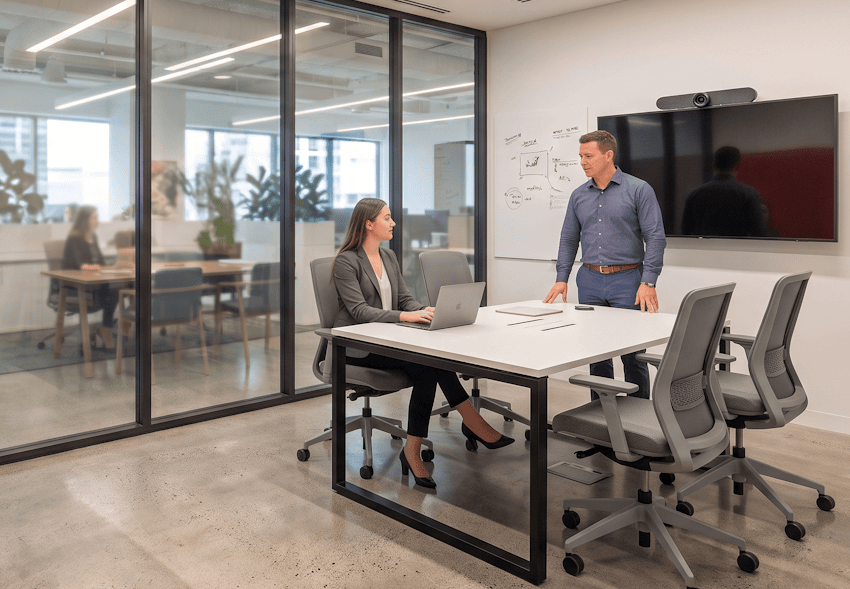
A Work-Meet Room is a small enclosed room that does two jobs. A manager can use it as a quiet office for focus work. A team can book it as a room for a four or five person huddle. Instead of building separate private offices and separate small meeting rooms, you fold both needs into one bookable room that rotates between users. You save floor space without losing meeting capacity or private work space. Most organisations land somewhere around one of these rooms for every twenty five to thirty staff, though it depends a lot on how many managers you have and how meeting heavy your teams are. Below, we discuss how to design Work-Meet Rooms and run them through ecobook.
When and Why Organisations Use Work-Meet Rooms
The WMR model answers a real estate problem. Managers need private space for confidential reviews, calls, and focused work. Teams need rooms for small huddles. If you build both as separate rooms, you roughly double the space you need. A WMR does both. One manager books it for solo work in the morning, a team books it for a meeting in the afternoon.
WMRs work best when:
1. Manager density is moderate. You have enough managers to justify quiet space, but not so many that everyone expects a private office.
2. Meeting demand is high. Teams need small huddle rooms often, not just the odd big boardroom.
3. Real estate is tight. Space costs money, and combining functions cuts the rent you pay for it.
4. Booking discipline is strong. The model only works if people book ahead and accept that the room is shared.
5. Hybrid schedules are predictable. When managers have steady office days, the room is easier to schedule around.
Context decides a lot. A distributed tech company that runs on async messages and few scheduled meetings may not need WMRs at all. A professional services firm with packed calendars and plenty of manager led client calls will lean on them every day.
Work-Meet Room Specifications
| Specification | Guidance |
| Interior floor area | Big enough to hold a desk and a small meeting table at once without feeling cramped. |
| Meeting capacity | Comfortable for a small huddle of a few people seated, with room for a couple more standing. |
| Door swing and approach | A clear, wide doorway with enough room to approach it from the corridor. |
| Desk provision | A compact desk in a corner or along a wall, height adjustable where you can manage it. |
| Meeting table | A modular or folding table that moves aside or folds away for solo use. |
| Acoustic performance | Glazing treated so calls do not leak into the room next door. Use acoustic glass or add interior panels. |
| AV and display | A wall mounted display with a video call camera, microphone, and wireless screen sharing. |
| Power and data | Enough power and data at both the desk and the meeting table, with network points for connected devices. |
| Accessibility | A clear doorway, a height adjustable desk, a table at reachable height, and a spot on an accessible route. |
| Typical provision | Roughly one room per small group of staff, adjusted for how many managers you have and how meeting heavy teams are. |
Design Considerations That Enable Dual Use
The furniture has to move. A fixed conference table wastes the room when a manager works alone. A folding or modular table, or a wall mounted fold down table, lets the room switch from meeting mode to office mode in a minute. Glazing is a balance too. Full height glass makes the room feel like shared space rather than someone’s private office, but it needs acoustic treatment or calls leak out. Opaque glass gives privacy but can feel closed off. An opaque lower panel with a clear upper panel usually gets you both.
AV quality matters more here than in an ordinary room, because a manager might join a video call alone or a team might present to remote colleagues. Put a decent camera, microphone, and display in the room. Poor AV defeats the point. The last piece is booking discipline. WMRs only work when people respect the calendar and do not sit on a room all day. ecobook lets you set time limits and stop back to back reservations that lock everyone else out.
Common Mistakes to Avoid
A few mistakes come up again and again:
1. Fixed furniture that will not reconfigure. A permanently mounted meeting table fails the moment a manager needs solo desk space.
2. Weak booking discipline. Without clear rules and a bit of monitoring, the same people hoard the rooms. ecobook analytics show you who and how often.
3. Making the room too small. Cram a desk and a meeting table into a tiny room and it feels cramped. Give it enough space to work as both.
4. Poor acoustic glazing. Plain full height glass carries sound, so a call in one room disturbs the next. Use acoustic glass or add interior panels.
How Work-Meet Rooms Are Managed in ecobook
ecobook treats a WMR as one bookable room that serves two jobs. A manager reserves it for solo work. A team books the same room for a meeting.
You have two ways to run these rooms. You can open them to everyone first come first served, which is simple and fair but means a manager may not get quiet space on a busy day. You can add a digital room display tablet to allow staff to make a quick booking or see the available on the spot. ecobook shows you whether the rooms get used for meetings or quietly held as private offices. If one manager books the same room every morning at nine, the pattern is there to see, and you can adjust the policy or add a room based on what is actually happening.
Frequently Asked Questions
Is a WMR really a substitute for a private office, or does it feel inadequate?
It depends on what people expect. A manager used to a permanent office may feel short changed. Framed as a shared room that is good for both meetings and focus work, it feels purposeful instead. The rest is culture. Teams that are comfortable sharing space see WMRs as efficient. Clear, fair booking rules make the difference.
How do we prevent managers from monopolising WMRs?
Set time limits and watch the usage. Cap solo bookings shorter and meeting bookings shorter still, and let ecobook enforce the limits and flag people who run over. Check the patterns now and then so you can spot hoarding and adjust before it becomes a problem.
Can a WMR work as a 1:1 meeting space as well as a team huddle room?
Yes. A room sized for four or five people is fine for a one on one. The same room covers both, depending on who books it and why.
What’s the difference between a WMR and a small meeting room?
A WMR does two jobs, solo managerial work and small meetings. A small meeting room only does meetings. WMRs save space but need more care in design, modular furniture, good AV, and booking discipline. A dedicated small room is simpler, but it sits idle when meeting demand comes and goes.
Wrapping Up
WMRs earn their keep when you design them to flex and hold the line on booking. Give the room movable furniture, good AV, and clear time limits, then watch how it gets used. For example, a professional services firm of around 300 people replaced six private offices and four small meeting rooms with ten WMRs. Managers got quiet space on their office days, teams got huddle rooms when they needed them, and the floor freed up room for a larger open area. Plan your Work-Meet Rooms around real usage, connect them to ecobook, and let the data tell you whether to adjust policy or add rooms. Map your rooms in ecobook today.